Overview
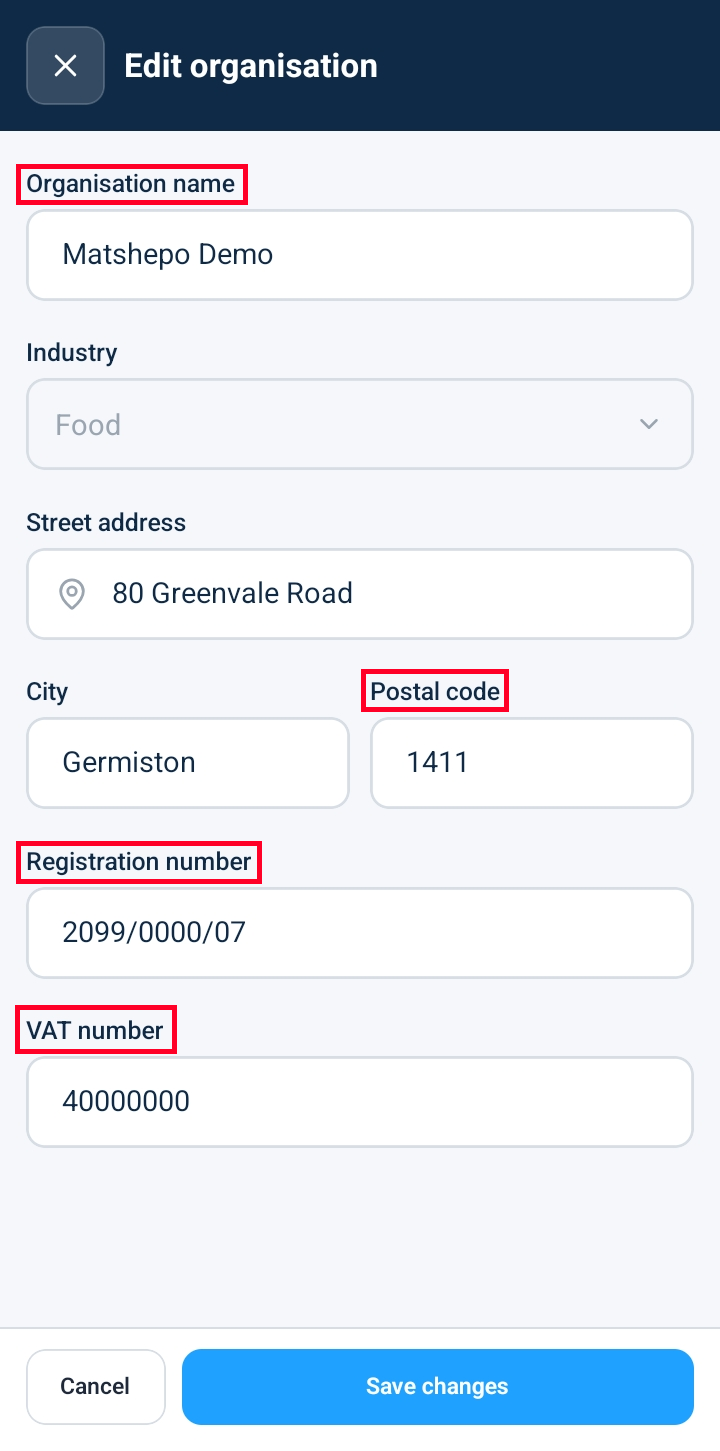
Organization Administrators can update central company information, tax details, and mailing addresses directly from the Organization Settings page. Opening the edit form exposes primary administrative inputs—including company name, registration numbers, tax/VAT identifiers, and physical address details—allowing teams to maintain accurate corporate profiles across all system-generated reports and invoices.
Editing Organization Profile Information
Navigate to Organization Settings (or select Organization from the administrative menu).
Click Edit Organization (or the edit pencil icon) to launch the profile editor.
Update any required administrative and operational fields:
Organization Name: Enter the official trading or corporate entity name.
Registration Number: Update company business registration numbers or legal identity codes.
VAT / Tax ID: Enter or modify tax registration numbers for compliance and billing documents.
City: Update the municipal or metropolitan location of the main office.
Postal Code: Modify the regional postal or ZIP code.
Review your entries and select your desired action:
Save Changes: Click Save to commit the updated profile information to the system.
Cancel: Click Cancel to discard edits and revert to the previously saved organization details.
Frequently Asked Questions & Troubleshooting
Who has authority to edit organization details?
Modifying organization profile details requires Organization Administrator permissions. User accounts assigned as Managers, Supervisors, or Technicians can view profile information but cannot access the edit form.
Will updating the Organization Name affect existing inspection reports or invoices?
Updating the organization name changes the corporate header for all newly generated PDFs, exports, and system notices. Past, finalized inspection logs retain the organization name as it existed when the report was originally submitted.
What happens if I click Cancel while editing?
Clicking Cancel closes the editor modal immediately without saving any altered input fields, preserving your existing organization profile data intact.
Was this article helpful?
That’s Great!
Thank you for your feedback
Sorry! We couldn't be helpful
Thank you for your feedback
Feedback sent
We appreciate your effort and will try to fix the article