How to Duplicate an Asset TypeOverview
Administrators can quickly create new asset categories by duplicating an existing Asset Type. Duplicating pre-fills all rules, risk levels, pass thresholds, and structural attributes from the source asset type—prefixed automatically with "Copy of"—allowing you to easily update the title, add a description, and save your new category without configuring settings from scratch.
Pre-requisite:
1. Asset-type:create and Asset-type:view permissions.
Duplicating an Asset Type
Navigate to Settings > Asset Type Settings > Asset Types tab.
Click + Create Asset Type.
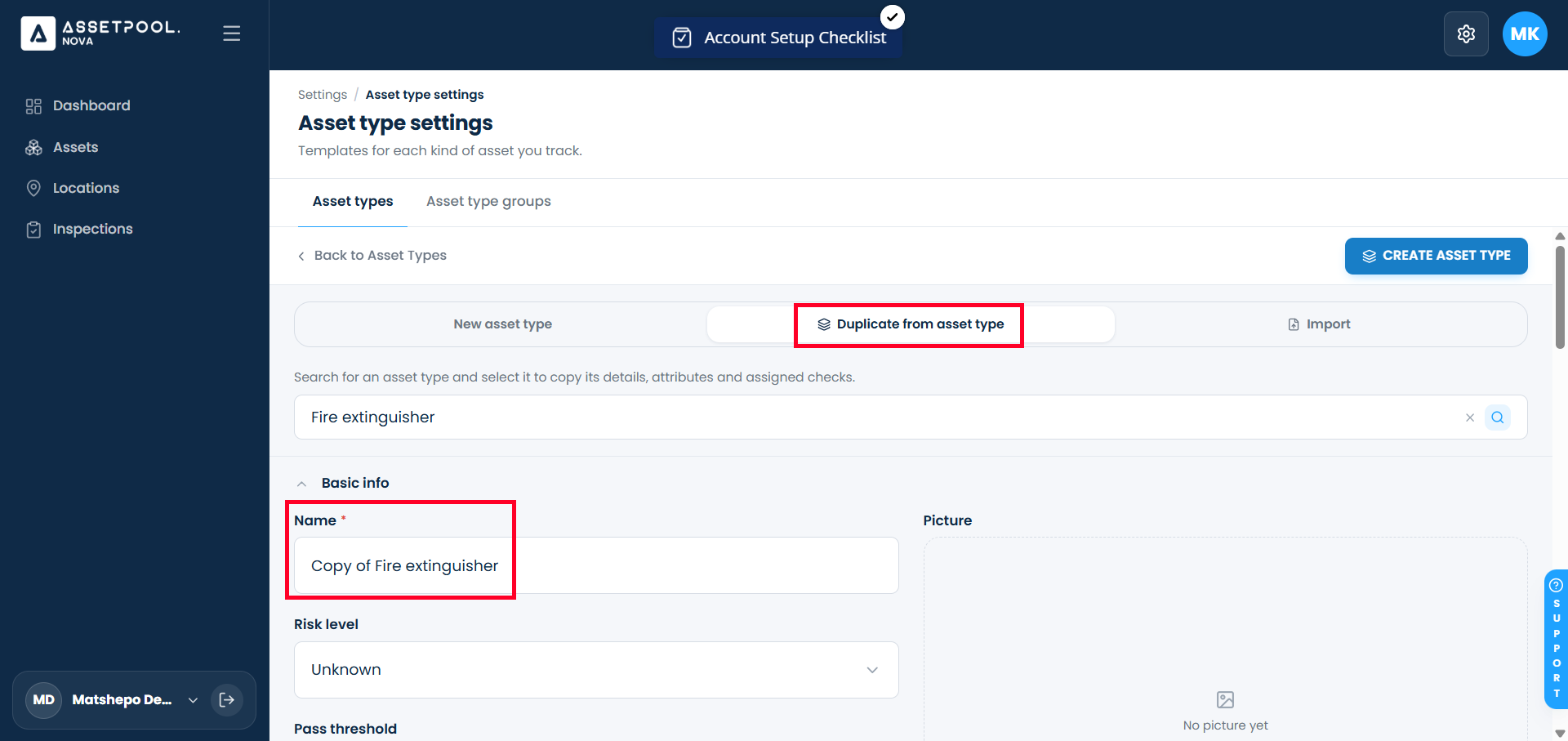
Select Duplicate from Asset Type.
Search for and select the source asset category you wish to copy.
The form will pre-fill with the original asset type’s settings and set the default name to Copy of [Source Asset Type Name]:
Update the Name: Replace the default title with a unique name (e.g., change Copy of Heavy Generators to Heavy Generators - Stationary).
Description: Enter or modify the operational guidelines for this asset category (Description is a required field).
Click Create Asset Type.
Return to the primary Asset Types table to view your new duplicated asset category.
Frequently Asked Questions & Troubleshooting
Why do I need to enter a description when duplicating an Asset Type?
While duplicating pre-fills configuration rules from the source category, a valid Description is mandatory to save any new or duplicated Asset Type.
What happens to the name field during duplication?
The duplicate tool automatically sets the title to "Copy of [Source Asset Type Name]". Renaming it to a unique title ensures your asset categories remain clearly organized and avoids duplicate-name conflicts.
Which settings are copied over during duplication?
Duplicating copies all pre-configured parameters from the source Asset Type, including risk classifications, pass threshold percentages, and custom attribute requirements.
Why is my new duplicated asset type taking a moment to appear in the list?
Backend processing for cloned asset categories can take a few seconds. If the page does not automatically redirect to the table after saving, allow up to 30 seconds for the request to finalize, or refresh your browser view.
Was this article helpful?
That’s Great!
Thank you for your feedback
Sorry! We couldn't be helpful
Thank you for your feedback
Feedback sent
We appreciate your effort and will try to fix the article