Overview
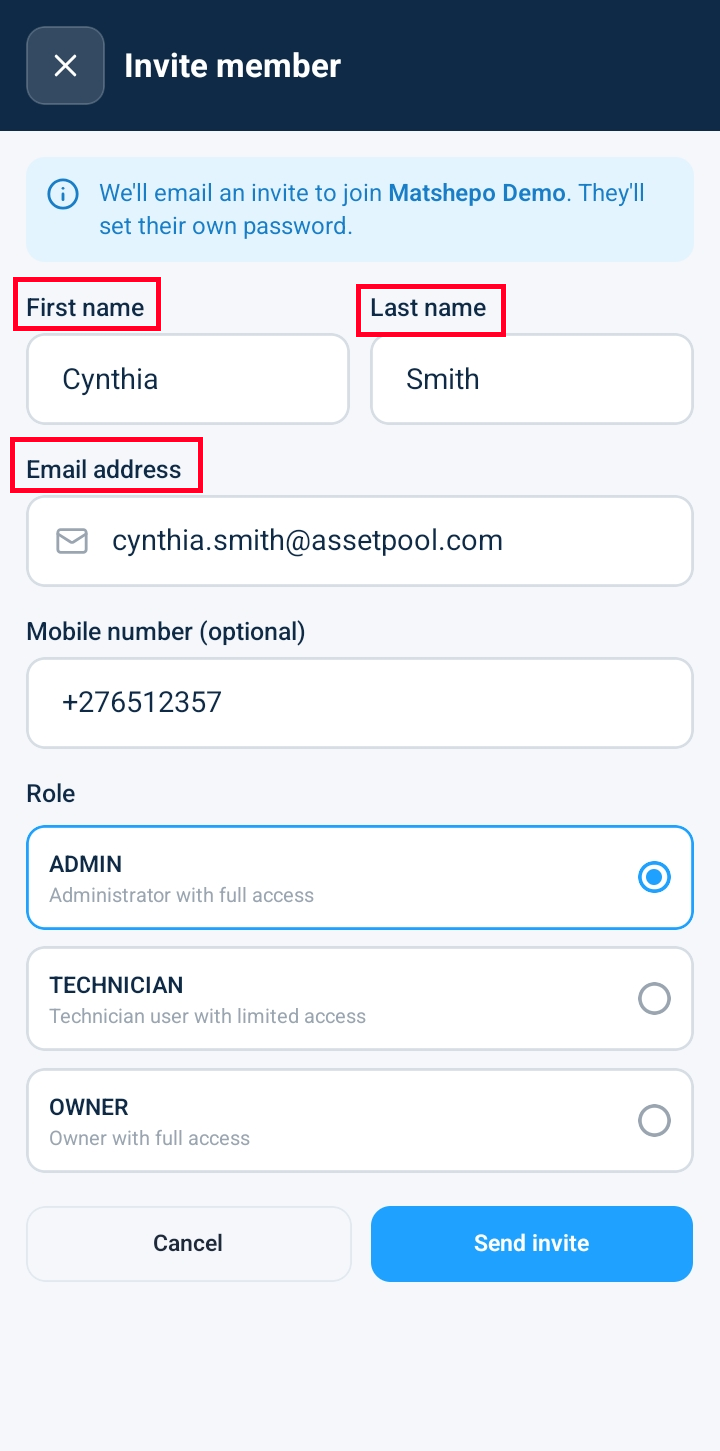
Administrators can expand their operational team by inviting new users directly from the Users Directory. Opening the user invitation form provides input fields to capture the new member's name and contact email address, alongside clear submit and cancellation actions to manage team onboarding.
Accessing the User Invitation Form
Tap the hamburger menu top left and scroll down to the bottom of the navigation drawer and tap on Settings > Users.
Click + Invite User to launch the user invitation screen.
Complete the required contact and identity fields:
First Name: Enter the user's name.
Last Name: Enter the user's surname name.
Email Address: Enter the user's official corporate email address (where the system invitation link will be sent).
Mobile number: Enter the user’s mobile number.
Role: Tick the role to be assigned to the user.
Scroll to review the form action controls:
Send Invite Button: Dispatches an automated email invitation containing temporary login instructions and account setup links.
Frequently Asked Questions & Troubleshooting
What happens after I click Send Invite?
The platform automatically generates and dispatches an email invitation to the specified address. The recipient receives a secure link to confirm their email, create a password, and join your organization's workspace.
Can I assign specific roles (e.g., Technician, Manager) during the invitation process?
Yes. Depending on your organization settings, role selection dropdowns or permission assignment options appear on the invitation screen so you can set initial access rights prior to sending the invite.
What should I do if the invited user does not receive the email?
Advise the user to check their junk or spam folders. If the email cannot be located, open the user's profile under Users Directory > Pending Invites to resend the invitation link or verify the email address entry.
Was this article helpful?
That’s Great!
Thank you for your feedback
Sorry! We couldn't be helpful
Thank you for your feedback
Feedback sent
We appreciate your effort and will try to fix the article